
ET: Legacy 2.84 - Clear the Mines!
Greetings everyone!
It has been over a year since our last 2.83.2 - Mom it's working!!! release, and we are thrilled to finally announce the next ET:Legacy update. The changelog is, as usual, unbelievably long. But do not worry, we have added it to the in-game menu too! With the addition of numerous new features and corresponding console commands, having this documentation available through menu can be a valuable resource.
Without further ado, let’s take a closer look at some of the highlights.
Weapon Zoom
Previously used primarily by competitive players, this feature has now been added as a bindable option along with additional settings. It allows users to toggle between FOV values (in the range of 75 to 160) to provide weapon zoom. Moreover, it can be accompanied by either a mouse sensitivity scale value or an exact sensitivity value override.
Following commands have been added:
| Command | Description |
|---|---|
| +weapzoom | Zoom in. |
| -weapzoom | Zoom out. |
| toggleweapzoom | Above commands combined. |
Example: /bind MOUSE4 toggleweapzoom
And on top of that, these cvars can be used for adjustments:
| CVAR | Description |
|---|---|
| cg_weapzoomFov | FOV used to zoom in. |
| cg_weapzoomInTimeMs | Transition time when zooming in. |
| cg_weapzoomOutTimeMs | Transition time when zooming out. |
| cg_weapzoomSensitivityScale | Scale of sensitivity when zooming in, depending of unzoomed sensitivity value. |
| cg_weapzoomSensitivityOverride | When set, use an exact value instead of scaled sensitivity from the cvar above. |
| cg_onWeapzoomStart | Trigger a custom command when zooming in. |
| cg_onWeapzoomEnd | Trigger a custom command when zooming out. |
UI and HUD Editor
Sniper Scope
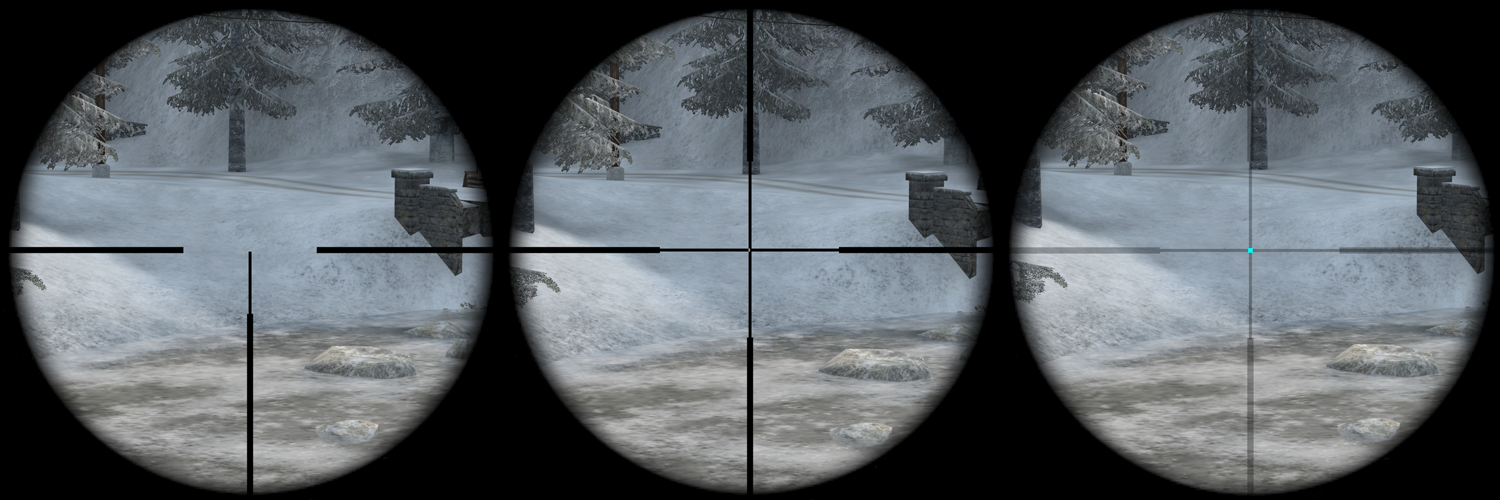
You can now customize the scope with settings found under View->Extended->Scope Reticle. Overall, there are three styles that you can choose from: Cross, Three posts (T-shaped), and Dot. You can also add a dot on top of the cross and the three posts. All available options are these:
| CVAR | Description |
|---|---|
| cg_scopeReticleStyle | 0 - use default |
| 1 - force cross | |
| 2 - force 3 posts (center dot will be drawn if of a different color) | |
| 3 - force center dot only | |
| cg_scopeReticleColor | Accepts HEX code (000000FF), RGBA, Float (0.0-1.0), or a color name (string) |
| cg_scopeReticleDotColor | Accepts HEX code (000000FF), RGBA, Float (0.0-1.0), or a color name (string) |
| cg_scopeReticleLineTickness | Sets the reticle line thickness. Default 2. |
| cg_scopeReticleDotTickness | Sets the reticle line thickness. Default 2. |
Bars
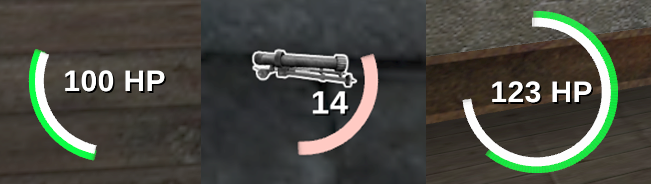
Health and stamina bars can be now drawns as circle, or a partial circle if you wish. These customization options are now part of HUD editor:
| Circular | tickbox in the HUD editor. |
| Density: | Control the number of squares to be draw to complete the circle depending of the thickness. |
| Star Angle: | The angle between 0 and 360 where the first point is draw on the circle. |
| End Angle: | The angle between 0 and 360 relative to the start point pointing to the last point to be draw on the circle. |
| Thickness: | The circle thickness in pixels. |
Compass
It is now possible to rotate the map in the compass via the Point North style. We have also added decor to the square compass and fixed issues like its cardinal point alignment (scaling issues), map icons appearing outside the compass border, and the issue where the compass would disappear while wounded. Now, it is only hidden in spectator mode (excluding the shoutcaster). Moreover, we have added dynamic ticks and dynamic direction style options for the compass in the HUD editor. These work on a static compass map; it is also worth mentioning that if the dynamic tick is enabled, dynamic direction will be ignored.
HUD Editor
These are kind of quality of life improvements. The HUD was reworked with extra button to enable Tab customization depending of component nature. On top of that, we have added binded functions as following:
| Key | Description |
|---|---|
| S | Shape the selected component bound into a square, using the longest side for both side. |
| R | shape the selected component bound into a rectangle with proper ratio using 20% on the longest side for the smaller side, |
| M | Mirror the width and height of the selected component bound. |
And more UI
The UI changelog is simply too long to go through every point. An honorable mention goes to the Fireteam overlay improvements, which have gone through many fixes. These include the addition of the ability to draw names left-aligned with a fixed width (by setting cg_fireteamNameAlign -1) and the option to add mini health bars into the fireteam overlay. You can extend the fireteam window with a lot of information or keep it compact with just the basics.

Another improvement is the added headshot obituaries in kill feed, makes us an esports shooter once again!
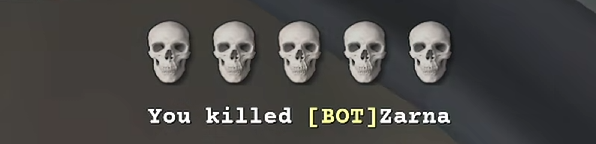
We also added a new iconfeed HUD component, tracking multikills via skulls icons. It is acompanied by cg_iconfeedStayTime cvar to customize icons feed time appearance, and cg_iconfeedScale cvar to customize icons feed size.
And last but not least, we have added the cg_shoutcastTeamScoreRed and cg_shoutcastTeamScoreBlue cvars to display the team scores in shoutcaster mode. There are also new commands to increase, decrease, reset, and swap the team scores. See the full changelog to read more about these changes.
Android
Androids UIs code got some heavy rework in this version. Many people were asking for ability to customize buttons as they need, which is possible now. Overall the changes include:
| - | Added Options to Edit/Delete UI, |
| - | UI Elements are now editable (Postitions and Scale of Buttons), |
| - | Added option to change themes via swipe gestures, |
| - | Added Custom Keyboard Extension (Long Press on Keyboard Button to show/hide it, so far no text input allowed), |
| - | Physical Keyboard (USB) is now 90% working, no bluetooth keyboard tested, |
| - | Mouse input is now fully working (Non Relative Mode only, fix for Relative Mode is mandatory). |
Graphics
There have been a few nice improvements to make the game experience more smooth. What you might notice in-game is that some animations are now more exact and lerped with their functions, like:
| First person hand silencer screw animation, |
| Hands when throwing a grenade, |
| Rifle grenades look nicer, |
... and more.
Blood puffs efffect (when shooting at a player) got some rework, too! The default values were a bit too much for eyes, so we reduced scale by 85% and opacity by 65% from the original values. They also got removed from self in first person view, and got a little new function too!
| Cvar | Description |
|---|---|
| cg_bloodForcePuffsForDamage | Default "1" - if enabled always shows smoke puffs for shooting invulnerable players (spawn prot. shield) otherwise always shows blood puffs. |
And because it is so fun to play with math in game engines, we used incoming damage direction for gibs so explosive gibs keep travelling with the incoming blast direction. Whoo!
And for modders and mapmakers, we have also added r_debugShader cvar. This will display shader name as you focus on the surface with camera (by trace).
XPSave
We added extended functionality of XPSave g_xpSaver. Server admins can now use these:
| Value | Description |
|---|---|
| 1 | Enable XP Save on disconnect. |
| 2 | No reset on map restart. |
| 4 | No reset ever. |
| 8 | Call ClientDisconnect() on clients with the same GUID. |
| 16 | Do not use xp-save when playing Stopwatch gametype. |
| 32 | If enabled, the server tries to import old XP format into etl database. |
We have also added g_xpSaverMaxAge to determine how long to keep saved xp, skillpoints and medals of the player.
And More!
Revives
Added g_legacyRevives: When g_legacyRevives is 0, revive behavior remains unchanged to 2.60b. When g_legacyRevives is 1, revived players are always reoriented to the view direction recorded when they were downed.
The first revive per respawn blocks all pliers interactions with dynamite and gives visual feedback.
Enhanced demo UI buttons
| Buttons now have proper graphics, rather than using < and > strings. |
| Play/pause button now shows a pause or play icon, depending whether the playback is paused or not. |
| Buttons now have a hover color, and audible feedback when clicked. |
| Current/end time of demo is now visible underneath the ticker. |
| The ticker now performs actions on key up rather than key down - this allows dragging the ticker to a specific time, and then releasing mouse button. |
| Hovering over the ticker or dragging it now displays a tooltip, indicating the timestamp at mouse cursor position. |
| Fixed demo rewinding issues. |
| Allowed rewinding/fast-forwarding when demo is paused. |
Console
Some quality of life improvements have been made here, namely:
| Alphabetical and properly aligned cvar list on auto completion, | |
| Added coloration for commands and cvars values by default match and show current value on auto completion. | |
| Added descriptions to cvars in console. | |
| Added console keyboard shortcuts: | Shift+PgUp now jumps to the top of console scrollback |
| Shift+PgDn now jumps back to the bottom/live console output | |
| Ctrl+U clears the entire line | |
| Ctrl+W and CTRL+Y console line editing (CTRL+W stops on: \, /, _ and camelCase changes) |
Other than that...
| We added setclosestspawnpt command that automatically selects the minor (or major) spawn closest to you. |
| Fixed cg_weapaltSwitches 0 that wasn't working correctly. |
| Allowed vsay_team for spectators. |
| Allowed syringe hits to pass through deployables (satchel / dynamite / landmine) |
Download ET: Legacy 2.84 HERE
written by WuTangH 4 months ago
No comments