ET: Legacy

ET: Legacy - free open source multiplayer fps game

ET: Legacy Team Blog

ET: Legacy 2.84 - Clear the Mines!

etl_2_84

Greetings everyone!

It has been over a year since our last 2.83.2 - Mom it's working!!! release, and we are thrilled to finally announce the next ET:Legacy update. The changelog is, as usual, unbelievably long. But do not worry, we have added it to the in-game menu too! With the addition of numerous new features and corresponding console commands, having this documentation available through menu can be a valuable resource.

Without further ado, let’s take a closer look at some of the highlights.


Weapon Zoom

Previously used primarily by competitive players, this feature has now been added as a bindable option along with additional settings. It allows users to toggle between FOV values (in the range of 75 to 160) to provide weapon zoom. Moreover, it can be accompanied by either a mouse sensitivity scale value or an exact sensitivity value override.

Following commands have been added:

Command Description
+weapzoom Zoom in.
-weapzoom Zoom out.
toggleweapzoom Above commands combined.

Example: /bind MOUSE4 toggleweapzoom

And on top of that, these cvars can be used for adjustments:

CVAR Description
cg_weapzoomFov FOV used to zoom in.
cg_weapzoomInTimeMs Transition time when zooming in.
cg_weapzoomOutTimeMs Transition time when zooming out.
cg_weapzoomSensitivityScale Scale of sensitivity when zooming in, depending of unzoomed sensitivity value.
cg_weapzoomSensitivityOverride When set, use an exact value instead of scaled sensitivity from the cvar above.
cg_onWeapzoomStart Trigger a custom command when zooming in.
cg_onWeapzoomEnd Trigger a custom command when zooming out.

UI and HUD Editor

Sniper Scope

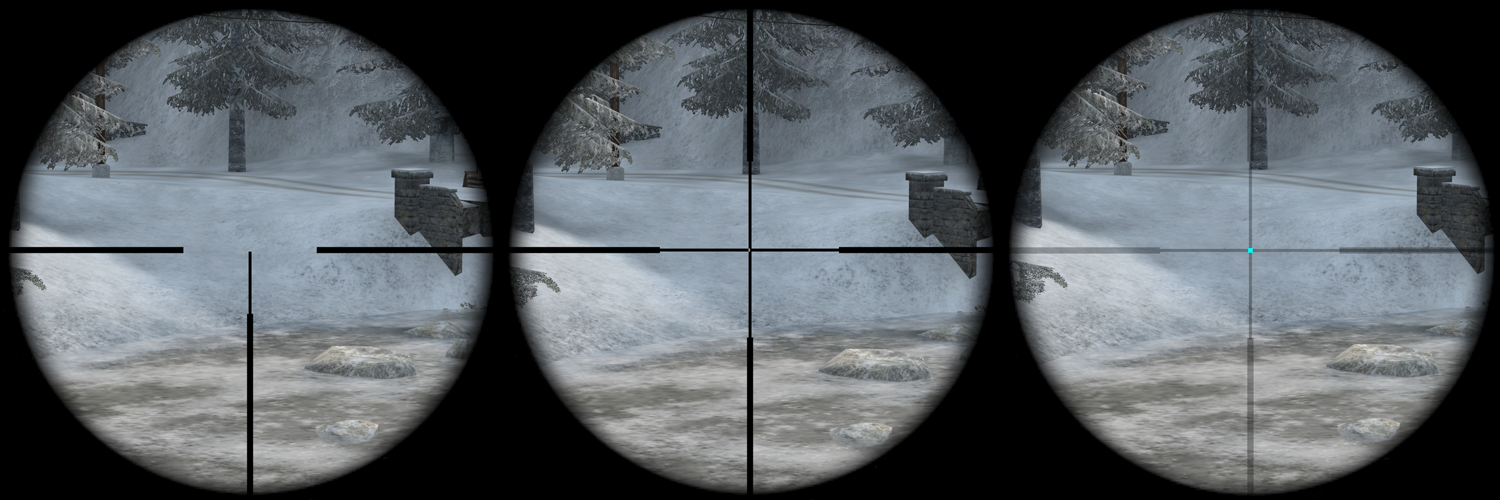
You can now customize the scope with settings found under View->Extended->Scope Reticle. Overall, there are three styles that you can choose from: Cross, Three posts (T-shaped), and Dot. You can also add a dot on top of the cross and the three posts. All available options are these:

CVAR Description
cg_scopeReticleStyle 0 - use default
1 - force cross
2 - force 3 posts (center dot will be drawn if of a different color)
3 - force center dot only
cg_scopeReticleColor Accepts HEX code (000000FF), RGBA, Float (0.0-1.0), or a color name (string)
cg_scopeReticleDotColor Accepts HEX code (000000FF), RGBA, Float (0.0-1.0), or a color name (string)
cg_scopeReticleLineTickness Sets the reticle line thickness. Default 2.
cg_scopeReticleDotTickness Sets the reticle line thickness. Default 2.

Sniperscopes


Bars

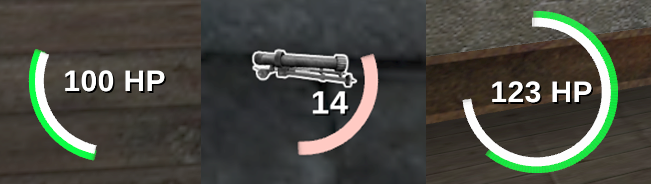
Health and stamina bars can be now drawns as circle, or a partial circle if you wish. These customization options are now part of HUD editor:

Circular tickbox in the HUD editor.
Density: Control the number of squares to be draw to complete the circle depending of the thickness.
Star Angle: The angle between 0 and 360 where the first point is draw on the circle.
End Angle: The angle between 0 and 360 relative to the start point pointing to the last point to be draw on the circle.
Thickness: The circle thickness in pixels.

Bars


Compass

It is now possible to rotate the map in the compass via the Point North style. We have also added decor to the square compass and fixed issues like its cardinal point alignment (scaling issues), map icons appearing outside the compass border, and the issue where the compass would disappear while wounded. Now, it is only hidden in spectator mode (excluding the shoutcaster). Moreover, we have added dynamic ticks and dynamic direction style options for the compass in the HUD editor. These work on a static compass map; it is also worth mentioning that if the dynamic tick is enabled, dynamic direction will be ignored.

HUD Editor

These are kind of quality of life improvements. The HUD was reworked with extra button to enable Tab customization depending of component nature. On top of that, we have added binded functions as following:

Key Description
S Shape the selected component bound into a square, using the longest side for both side.
R shape the selected component bound into a rectangle with proper ratio using 20% on the longest side for the smaller side,
M Mirror the width and height of the selected component bound.

And more UI

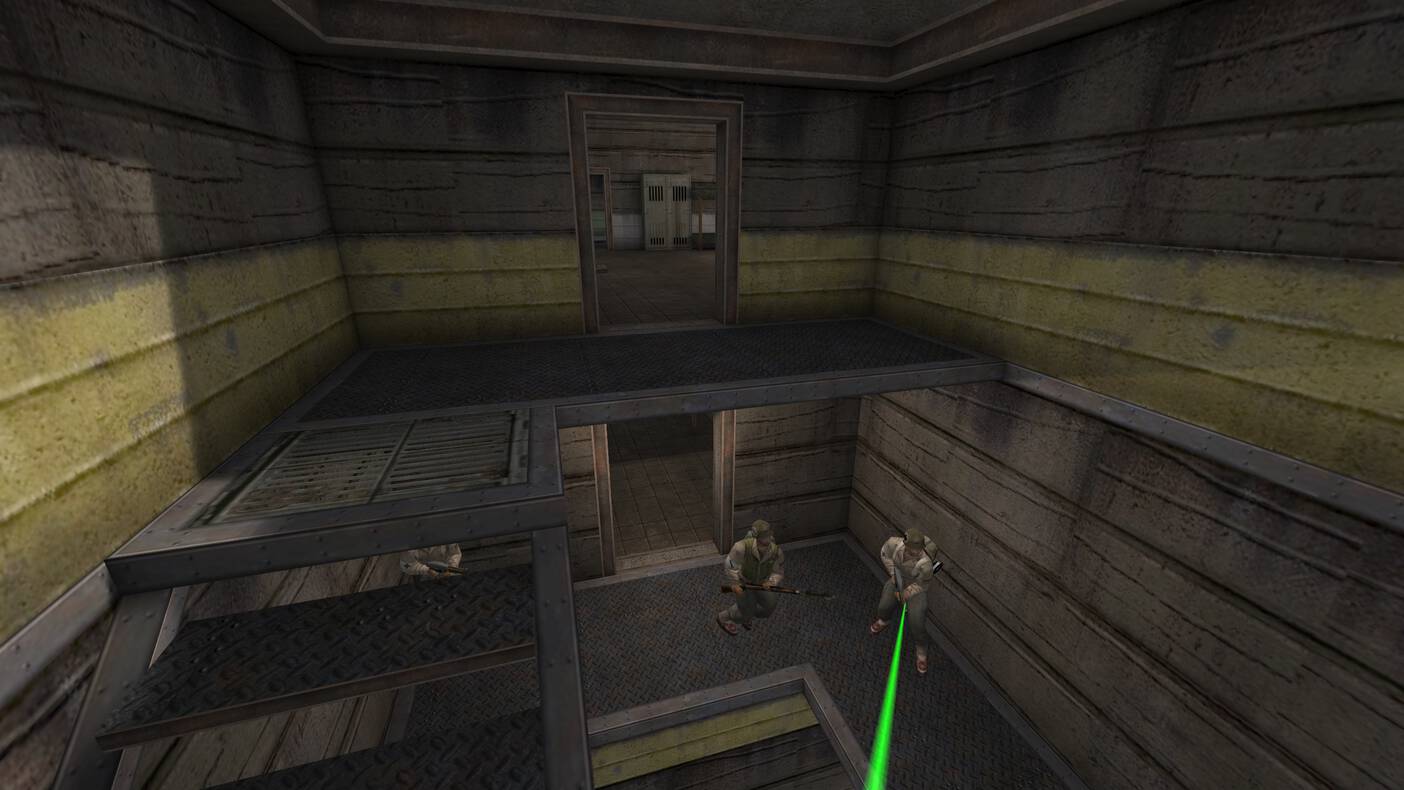
The UI changelog is simply too long to go through every point. An honorable mention goes to the Fireteam overlay improvements, which have gone through many fixes. These include the addition of the ability to draw names left-aligned with a fixed width (by setting cg_fireteamNameAlign -1) and the option to add mini health bars into the fireteam overlay. You can extend the fireteam window with a lot of information or keep it compact with just the basics.

Fireteams

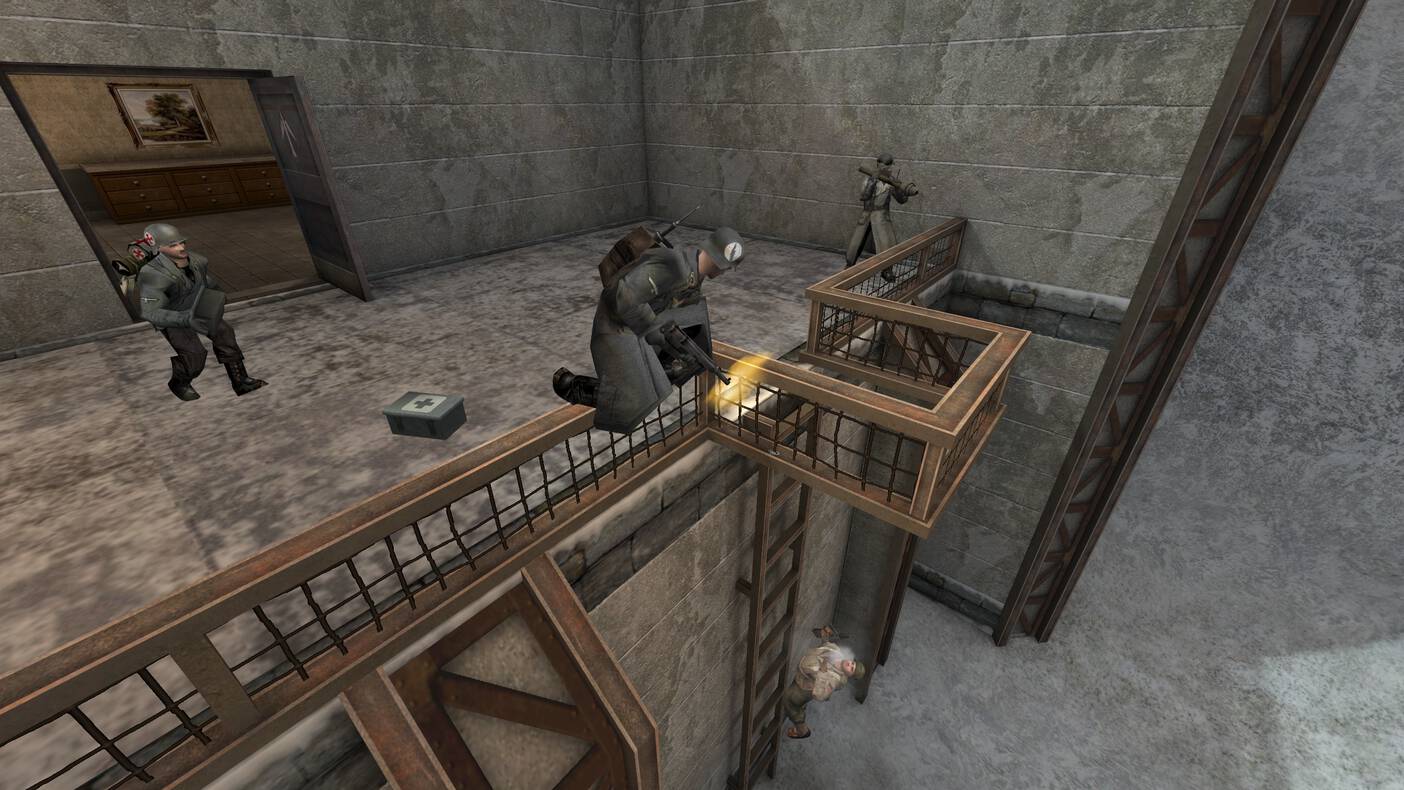
Another improvement is the added headshot obituaries in kill feed, makes us an esports shooter once again!

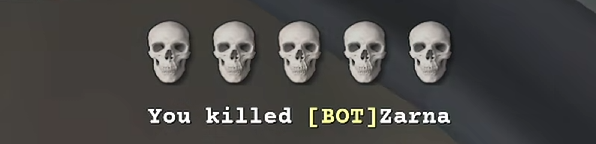
We also added a new iconfeed HUD component, tracking multikills via skulls icons. It is acompanied by cg_iconfeedStayTime cvar to customize icons feed time appearance, and cg_iconfeedScale cvar to customize icons feed size.
Multikill

And last but not least, we have added the cg_shoutcastTeamScoreRed and cg_shoutcastTeamScoreBlue cvars to display the team scores in shoutcaster mode. There are also new commands to increase, decrease, reset, and swap the team scores. See the full changelog to read more about these changes.


Android

Androids UIs code got some heavy rework in this version. Many people were asking for ability to customize buttons as they need, which is possible now. Overall the changes include:

- Added Options to Edit/Delete UI,
- UI Elements are now editable (Postitions and Scale of Buttons),
- Added option to change themes via swipe gestures,
- Added Custom Keyboard Extension (Long Press on Keyboard Button to show/hide it, so far no text input allowed),
- Physical Keyboard (USB) is now 90% working, no bluetooth keyboard tested,
- Mouse input is now fully working (Non Relative Mode only, fix for Relative Mode is mandatory).

Graphics

There have been a few nice improvements to make the game experience more smooth. What you might notice in-game is that some animations are now more exact and lerped with their functions, like:

First person hand silencer screw animation,
Hands when throwing a grenade,
Rifle grenades look nicer,

... and more.


Blood puffs efffect (when shooting at a player) got some rework, too! The default values were a bit too much for eyes, so we reduced scale by 85% and opacity by 65% from the original values. They also got removed from self in first person view, and got a little new function too!

Cvar Description
cg_bloodForcePuffsForDamage Default "1" - if enabled always shows smoke puffs for shooting invulnerable players (spawn prot. shield) otherwise always shows blood puffs.

And because it is so fun to play with math in game engines, we used incoming damage direction for gibs so explosive gibs keep travelling with the incoming blast direction. Whoo!


And for modders and mapmakers, we have also added r_debugShader cvar. This will display shader name as you focus on the surface with camera (by trace).


XPSave

We added extended functionality of XPSave g_xpSaver. Server admins can now use these:

Value Description
1 Enable XP Save on disconnect.
2 No reset on map restart.
4 No reset ever.
8 Call ClientDisconnect() on clients with the same GUID.
16 Do not use xp-save when playing Stopwatch gametype.
32 If enabled, the server tries to import old XP format into etl database.

We have also added g_xpSaverMaxAge to determine how long to keep saved xp, skillpoints and medals of the player.


And More!

Revives

Added g_legacyRevives: When g_legacyRevives is 0, revive behavior remains unchanged to 2.60b. When g_legacyRevives is 1, revived players are always reoriented to the view direction recorded when they were downed.

The first revive per respawn blocks all pliers interactions with dynamite and gives visual feedback.


Enhanced demo UI buttons

Buttons now have proper graphics, rather than using < and > strings.
Play/pause button now shows a pause or play icon, depending whether the playback is paused or not.
Buttons now have a hover color, and audible feedback when clicked.
Current/end time of demo is now visible underneath the ticker.
The ticker now performs actions on key up rather than key down - this allows dragging the ticker to a specific time, and then releasing mouse button.
Hovering over the ticker or dragging it now displays a tooltip, indicating the timestamp at mouse cursor position.
Fixed demo rewinding issues.
Allowed rewinding/fast-forwarding when demo is paused.

Console

Some quality of life improvements have been made here, namely:

Alphabetical and properly aligned cvar list on auto completion,
Added coloration for commands and cvars values by default match and show current value on auto completion.
Added descriptions to cvars in console.
Added console keyboard shortcuts: Shift+PgUp now jumps to the top of console scrollback
Shift+PgDn now jumps back to the bottom/live console output
Ctrl+U clears the entire line
Ctrl+W and CTRL+Y console line editing (CTRL+W stops on: \, /, _ and camelCase changes)

Other than that...

We added setclosestspawnpt command that automatically selects the minor (or major) spawn closest to you.
Fixed cg_weapaltSwitches 0 that wasn't working correctly.
Allowed vsay_team for spectators.
Allowed syringe hits to pass through deployables (satchel / dynamite / landmine)

Download ET: Legacy 2.84 HERE

Changelog | Discord


written by WuTangH 3 weeks ago

No comments

ET: Legacy 2.83.2 - Mom it's working!!!

We are please to announce a new patch version: ET: Legacy 2.83.2 'Mom, It's working!!!' For a full list of changes, please check the changelog

img_2.83.2

This patch version comes with mainly bug fixes and the following highlighed changes:


General

  • Using a color without specifing transparency was turning the color invisible.
  • On Windows, the resolution take in consideration the DPI set on OS level. This mean, on wider screen if you are using a zoom level different of 100%, it will now scale properly the windows.

Android

  • Application no longer require you to make sure you are running in Fullscreen Borderless mode and you can use default Fullscreen Settings thus making big change in Quality of Life/Use and expanding System Bar App is not minimizing itself.
  • There was issue with newer version of Android Devices 10+ when connecting to the server with older versions/snapshots. You were not able to connect. Due too Android changes in Security Restrictions limiting loading .so files from external storage it was not a case with Internal Storage which app has full access.
  • Previous Permissions required some rewriting to work with newer Android Versions 10+. When running in Android 11 you are welcomed with Permission Request for allowing access to modify/read/write file in external storage.
  • Let us separate pak0/1/2/3 files with rest of the downloaded/copied pk3 files. This makes application/game load maps/connecting to the server faster. Rest of the files are stored in External Storage/Documents/etlegacy.
  • Finally Fixing issue with permissions fixed this long hanging issue with watching your own/someone other demos. Now you can watch them easily by using Replays Menu of course those demos and required pk3 files needs to be copied into External Storage/Documents/etlegacy/legacy/demos and External Storage/Documents/etlegacy/legacy/dlcache

Stability & Performance

  • Fixed a crash where non-client trigering a door movement was playing a player animation
  • Restored implicit linking of entities via create without reusing an existing bmodel, which is used in some mapscripts

Gameplay

  • Fixed incorrect objective touch trigger was taking up item when out of range
  • Prevented /kill command when spawnshield is active

Graphics

  • Fixed tracers displaying incorrectly while spectating player
  • Fixed various 1st person hand animation quirks

UI

  • Fixed debriefing scoreboard was parsing incorect data set
  • Fixed players name/health crosshair draw time instant fade out
  • Allowed cg_customCrosshair to be moved with cg_crosshairX/Y cvars
  • Fixed cursorhint text and bar was draw on entity without a valid value
  • Fixed crosshair selection wasn't possible for some crosshairs
  • Fixed missing shader for some crosshairs
  • Fixed missing crosshair draw in menu option

NOTE: Check crosshair menu to discover all the missing crosshair which has been implemented previously, such as : Vertical line with a dot, X with a dot, Square stroke or Dot cross

Weapon

  • Fixed regression with scoped weapon, which create inconcistency with vanilla experience

As always, a huge thank you to all of your contributions, whether they are reports, suggestions, pull requests or self-made cookies. We are grateful for your continued support!

Download


written by Aranud 1 year ago

2 comments

ET: Legacy 2.83.0 - Mom it's working!

Welcome to a new Point Release!

We've been hard at work on Bugfixing and Qualify of Life improvements over the last months and are excited for everyone to get their hands on this one!

Please note that the server of your choice will update on their own pace and please refer to them for their update schedule.

As always we welcome anyone to participate in our Discord Server and to join our collective efforts!

(PATCH 2.83.1 released due to server configs not being properly loaded. )

v2.83 Banner


Changelog Highlights

This list highlights a subset of changes, for the full changelog, please refer to this page.

General

1. Windows binaries are now signed with an official certification
2. ETLTV Improvements

ETLTV now supports LUA alongside with many other improvements.
See the full changelog here

It has been successfully used to broadcast Nations Cup 2024 matches.

(A huge thanks to Ryzyk for his amazing efforts on these matters!)

3. Added new 'video-pipe' command to pipe game footage to ffmpeg

Pipes game footage to ffmpeg for video recording.

If ffmpeg isn't part of your PATH environment variable, the executable must be placed next to the etl binary.

Gameplay

1. Fix Flamethrower damage being dependent on 'sv_fps'

Flamethrower damage was previously dependent on 'sv_fps' and would cause massively more damage beyond 'sv_fps 20'.

This is now fixed by making the Flamethrower damage independent of 'sv_fps'.

2. Smoke Bomb puffs are now deterministic

Smoke from the Smoke Bomb of Covert Ops would previously flow into random directions on each client, causing situations where the view would be blocked for one client, but not blocked for another client.

This is now fixed by making Smoke from the Smoke Bomb deterministic and thus equal among all clients.

3. Medic's passive heal is now deterministic

Medics at full health would previously have a random 0-1 second delay before receiving their first passive heal tick.

They now always receive their first passive heal tick after exactly 1 second, making it deterministic.

4. Diagonal medpack/ammopack throws are now possible without immediate self-pickup

Medics and Field Ops would previously automatically pick up their packs when they throw it at a 45° Angle around them.

This is now fixed by improved pickup collision detection.

5. MG42/Browning automatically attempts to prone on 'weapalt'

MG42/Browning would previously require proning manually before they could be deployed.

In order to bypass the need for this extra key action, which could've already been automated by a user binding, deploying an MG42/Browning now automatically tries to prone before deployment, saving a keystroke by default, similar to mortar.

To opt out set 'cg_weapAltMgAutoProne' to '0' (default: '1')

6. Play 'noAmmoSound' when trying to switch to an empty weapon

Attempting to switch to a weapon which is out of ammo would previously fail without any sound or visual cue.

The 'noAmmoSound' is now being played as a sound cue (local to the player only).

To opt out set 'cg_weapSwitchNoAmmoSounds' to '0' (default: '1')

7. Disambiguate weapon bank collisions

This change disambiguates some weapon bank collisions:

1. A Soldier with SMG Perk having both an SMG and a heavy weapon

For such cases '2' will now select the SMG, '3' will select the heavy weapon.

2. A Soldier with SMG Perk having 2 SMGs

For such cases '2' will now select your team's SMG, '3' will select the other team's SMG.

To opt out set 'cg_weapBankCollisions' to '1' (default: '0')

Visuals

1. Fixed gunFovOffset regression and add ETL Dynamic Fov Offset

We introduced a regression in a previous release, where first person weapon models accidentally ended up being put too low in relation to the player view.

We have fixed this regression and introduced a new default ETL Dynamic Fov Offset feature, which now ships defaults that aim to have consistent gun offsets across different 'cg_fov' values.

These new defaults also aim to ship good default first person weapon visibility and consistency between the same weapon kinds of the 2 teams, while staying true to the original weapon look.
(e.g. the MP40 now should roughly occupy the same screenspace as the Thompson when reloading)

This also brings back guns, like the Panzerfaust, more to the forefront when it was accidentally previously cut short, without significantly obstructing visibility.

To opt out set 'cg_gunFovOffset' to '75' to keep '2.82.1' behavior, or to '90' to go even further back to Vanilla ET behavior (default: '0')

2. Tweaked Character Animations

Character animations have been slightly tweaked and reframed, to better represent playerstate and playeractions and to increase visibility in some instances.

Death animations have been revamped to allow better visibility.

Reload animations now better fit the weapon reload duration.

Jump animations now are able to support animation transition, when they didn't before.

Deploying/Undeploying an MG42 now plays a character animation.

Firing animations don't persist despite the player having stopped firing.

Alongside other small changes.

3. Player Float Sprites now follow heads when downed

Player float sprites, like the revive icon that Medics see for their teammates, now track the head position instead of being placed immediately at a fixed height, which would clip inside the body during the first half of the death animation.

This new feature does not affect hitboxes and is purely visual.

To opt out set 'cg_spritesFollowHeads' to '0' (default: '1')

4. Tweaked First-Person Weapons

Weapon animations have been reframed to more accurately reflect the duration of the weaponstate in instances where animations like reload would be interrupted or transition to soon to the IDLE animation despite still reloading.

Weapon parts have been realigned to reduce graphical glitches, where parts would hover or flick around the screen due to unclean animation frames.

In some instances models like hands were extended to not reveal clipped length at widescreen or higher 'cg_fovs'.

5. Tweak muzzle flash sizes

Muzzles flashes have been frequently completely disabled (via 'cg_muzzleFlash 0') in the past, as they have been shipped dramatically oversized with little transparency and thus heavily obstructed visibility.

We now ship a revamped set of default values with much improved visibility so that players are not incentivized to disable them in order to gain an advantage.

To opt out set 'cg_muzzleFlashOld' to '1' (default: '0')

6. Changed 'Geometric Detail' from 'r_lodbias' to 'r_lodscale'

The 'Geometric Detail' menu option previously made little difference and on highest option still caused needless polygon pop-in on character models

The underlying CVAR has been changed to better reflect the available options.

HUD

1. Various HUD QoL improvement

Big thanks to the community for all the feedback!

See the full documentation for details.

2. Custom 'hud.dat' is now backed up when upgrading to a new version
3. Added Sharp Custom Crosshairs

A new set of "vectorized"/sharp crosshairs have been added.

They replace previous crosshair implementations via 'cg_customCrosshair 1-4' and are configurable via a set of 'cg_customCrosshair*' CVARs.

etl-custom-crosshairs.png

Depending on player feedback, we plan to further improve them and to eventually wrap a Crosshair Editor around them in the future.

Documentation on the CVARs

4. Hotkeys for navigating limbo

The limbo menu is now traversable via keyboard hotkeys:

Team Selection
1 - Team Axis
2 - Team Allied
3 - Spectator

Class Selection
e - Engineer
c - Covert Ops
f - Field Ops
m - Medic
s - Soldier

Weapon Selection
TAB - Switch between Primary and Secondary Weapon Panel
Spacebar - Toggle Weapon Panel
1-9 - When Weapon Panel is opened, select weapon matching weapon index

Confirming/Cancelling
y/z/Return - Confirm (OK)
Escape - Cancel

5. New HUD 'chargebar'/'healthbar' needle

Both 'chargebar' and 'healthbar' gained a new needle indicator.

For 'chargebar' the needle indicates how much of the bar will be consumed by a given weapon.

For 'healthbar' the needle indicates the HP bonus that is granted from the amount of medics in your team.

To opt out uncheck 'Needle' on 'weaponchargebar'/'healthbar' in HUD Editor

6. Add kill assist system to the 'xpgain' component
7. Class Limbo Selection now requires confirmation

Selecting a class in the Limbo menu would previously automatically confirm the loadout.

In order to be able to look up the availability of weapons (e.g. Panzerfaust) without automatically switching to the class, selecting a class now only takes effect when the loadout is confimed via OK (or one of the new Limbo hotkeys: y/z/Enter).

To opt out set 'cg_limboClassClickConfirm' to '1' (default: '0')

8. 'F7' by default now toggles the HUD Editor.

Download the latest Release here


written by Vorschreibung 1 year ago

No comments

ET: Legacy 2.82.1 - Patches Again!

Hello everyone!

After the big ET: Legacy 2.82 release, we come back with the usual "hotfix", mostly adressing post-release issues.


The most notable are probably HUD fixes. Problems with their coversion should be fixed now.

There has also been more work done on ETLTV, supoporting 64+ players servers now, plus added chaining support.

We have been doing some futher fixes on the new crosshair versions, too - both in code and on their image files.

Mortar and Mobile MG jiggle effects have been reduced.

...and many more things!

Full Changelog at: CHANGELOG


DOWNLOAD Download ET: Legacy


etl2821


written by WuTangH 2 years ago

No comments

ET: Legacy 2.82 - Better late than never!

Yes, that's the name of the release and yes, we are aware that we've deviated from the quarterly release plan since last year. On the bright side though, it has not yet been a full year since the last release as we're 4 days early!


CHANGELOG

For the full changelog, please refer to this page

Notable engine changes include

ETLTV We've started paving the way for ETLTVTrackBase In cooperation with TrackBase admins, additional statistics data is shared with server trackers • Server demos Yes, we're getting there! Automatic server demos have been reworked, they are still a work in progress, feedback is appreciated • Package Manager ET: Legacy is now available at SnapCraft

Notable mod changes include

HUD editor Significantly strengthened the functionality of the HUD editor (https://etlegacy.readthedocs.io/en/latest/hudeditor.html). • AltWeap Improved behaviour for alternative weapons (primarily riflenades) on death and respawn


Although we started the year with the unfortunate news that this year's LAN event will be cancelled, it is great to see the competitive scene being strengthened in ET: Legacy events Discord. We wish the admins all the best and are hopeful to see another LAN event in the future. ~~Possibly with an ET: Legacy dev team participating?~~

Thank you to everyone for testing the development snapshots and providing feedback resulting in this full release being again packed with features for you. It's great to see the community interaction as active as it is. If you have any thoughts on ET: Legacy, we would be glad to have you on our Discord.

2.82.jpg


written by Kemon 2 years ago

No comments